Last updated: May 11, 2026
Quick Answer
Cursor AI is a standalone AI-powered code editor built on VS Code that provides intelligent code completion, autonomous agent-based coding, and deep codebase awareness. It costs $0–$200/month depending on tier, and it’s best suited for professional developers who want AI assistance integrated directly into their editing workflow rather than bolted on as a plugin.
Key Takeaways
- Cursor is a full IDE (not a plugin) that forks VS Code, so it supports existing extensions and keybindings
- The
/multitaskcommand (released May 2026) lets you run async subagents for parallel coding tasks [1] - Pricing: Free (limited), Pro at $20/month, Ultra at $200/month for heavy usage
- SpaceX announced a partnership in April 2026 with an option to acquire Cursor for $60 billion [6]
- Cursor scores 51.7% on SWE-bench but resolves tasks roughly 30% faster than GitHub Copilot
- Main competitors: GitHub Copilot ($10–39/month), Claude Code ($20/seat + usage), Windsurf ($15/month)
- A critical Git RCE vulnerability was patched in version 2.5 in early May 2026 with no reported exploitation [2]
- Bugbot updates in May 2026 added real-time self-improvement and MCP support for smarter code reviews [5]
- Vendor lock-in is the biggest drawback since Cursor only works within its own editor
What Is Cursor AI and Why Does It Matter for Software Development?

Cursor AI is a code editor that embeds large language models directly into the development environment. Unlike plugins that add AI on top of an existing IDE, Cursor rebuilds the editing experience around AI from the ground up.
The platform launched in 2023 and has rapidly gained traction among professional developers. By 2026, it’s positioned as one of the leading AI-first IDEs, with analysts at WP Brigade calling it “one of the most advanced AI code editors” for refactoring and debugging tasks. Forbes reported in March 2026 that Cursor is actively pursuing enterprise contracts and developing proprietary coding models to reduce dependency on any single AI provider [4].
What makes this relevant right now: the AI coding space is moving fast. Cursor’s approach of building a complete IDE (rather than a plugin) gives it deeper integration capabilities but also creates trade-offs around flexibility. Understanding these trade-offs matters whether you’re a solo developer or leading an engineering team.
If you’re exploring how AI is reshaping creative and development workflows more broadly, our comprehensive guide to AI-powered content generation tools covers the wider landscape.
How Does Cursor AI Actually Work?
Cursor works by maintaining awareness of your entire codebase, not just the file you’re editing. It indexes your project structure, understands relationships between files, and uses that context when generating suggestions or executing tasks.
Core capabilities include:
- Tab completions — Multi-line code suggestions that predict what you’ll type next based on surrounding context
- Chat interface — Ask questions about your codebase, request refactors, or get explanations of unfamiliar code
- Agent mode — An autonomous coding agent that can plan and execute multi-step tasks across files
/multitaskcommand — Released in May 2026, this spawns async subagents that work on separate tasks in parallel [1]- Bugbot — Automated code review that learns from pull request feedback and improves over time [5]
The editor is built on VS Code’s open-source foundation, so your existing extensions, themes, and keyboard shortcuts transfer over. This lowers the switching cost compared to a completely unfamiliar environment.
Common mistake: Treating Cursor like a simple autocomplete tool. Its strength is in agent-based workflows where you describe what you want at a high level and let it handle implementation details. LinkedIn analysis from Synthweb describes this as “vibe coding” — focusing on architecture and systems rather than syntax [10].
For teams working on design-to-development pipelines, Cursor pairs well with tools that bridge design and code. See our guide on Figma to code plugins for streamlining your workflow.
What Does Cursor AI Cost? Pricing Breakdown for 2026

Cursor offers three tiers. Choose based on how many AI interactions you need per day.
| Plan | Monthly Cost | Key Inclusions |
|---|---|---|
| Hobby | Free | 2,000 completions, 50 slow premium requests |
| Pro | $20 | Unlimited completions, 500 fast premium requests, agent mode |
| Ultra | $200 | Unlimited completions, unlimited fast premium requests, priority access to latest models |
Choose Pro if: You code daily and want agent mode without hitting request limits on most days.
Choose Ultra if: You’re using Cursor as your primary development tool for 6+ hours daily, or you’re on a team where AI-generated code volume is high.
Choose Hobby if: You want to test whether Cursor fits your workflow before committing.
Compared to GitHub Copilot’s $10–39/month range or Claude Code’s $20/seat plus usage-based pricing, Cursor Pro sits in the middle. The Ultra tier is significantly more expensive, but it removes throttling entirely.
How Does Cursor Compare to GitHub Copilot, Claude Code, and Windsurf?
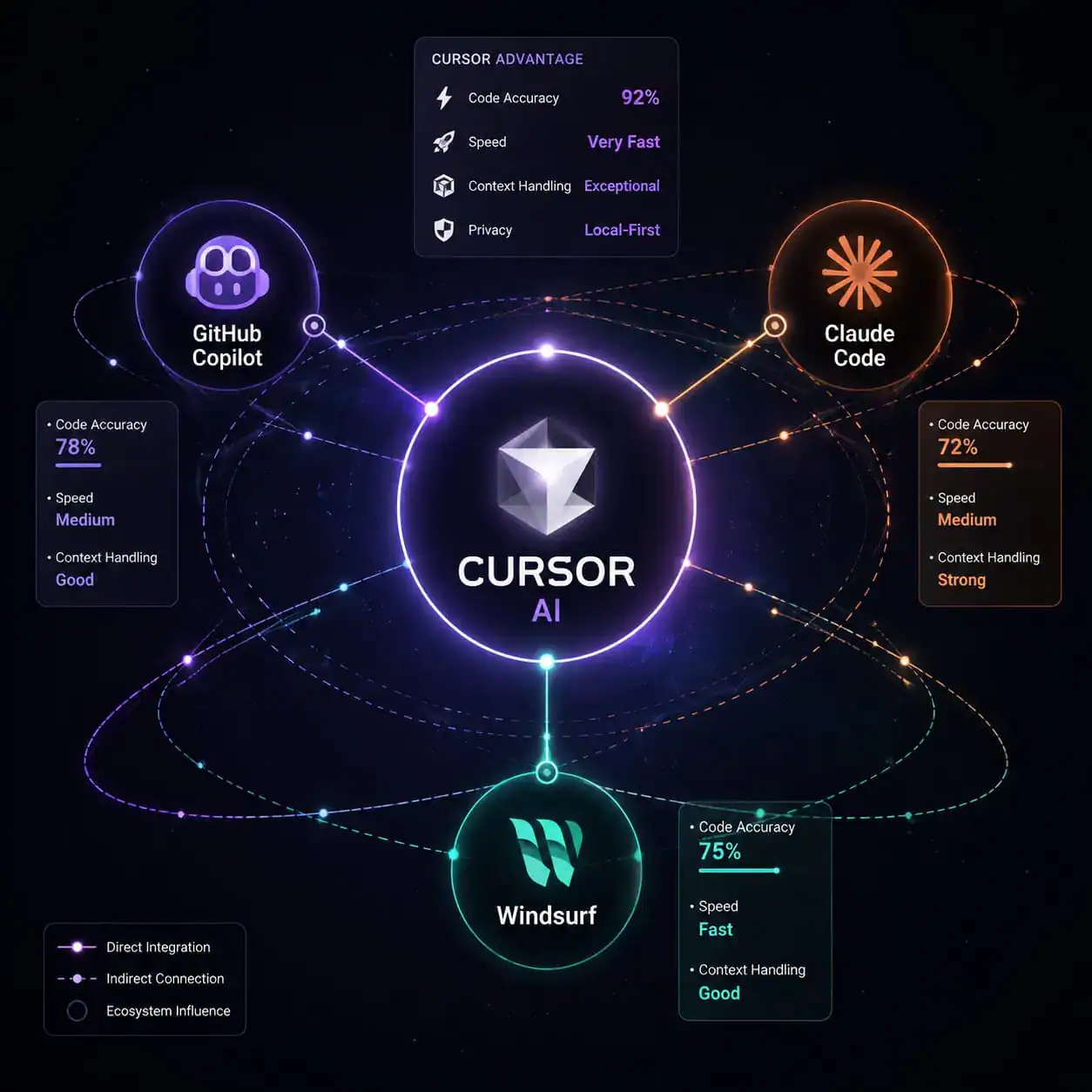
Cursor leads in IDE integration depth and task resolution speed. GitHub Copilot wins on flexibility and price. Claude Code suits terminal-first autonomous workflows. Here’s how they stack up:
| Feature | Cursor | GitHub Copilot | Claude Code | Windsurf |
|---|---|---|---|---|
| Price | $20–200/mo | $10–39/mo | $20/seat + usage | $15/mo |
| IDE support | Cursor only | VS Code, JetBrains, Neovim, etc. | Terminal/Slack | Own editor |
| SWE-bench score | 51.7% | 56% | Varies by model | Not published |
| Task speed | ~30% faster | Baseline | Varies | Comparable |
| Agent autonomy | High | Moderate | Very high | Moderate |
| Vendor lock-in | Yes (own editor) | No (multi-IDE) | No (terminal) | Yes |
Source: CosmicJS comparison and Tech Insider testing from early 2026.
Decision rules:
- Choose Cursor if you want the deepest AI integration within a single editor and don’t mind being locked to it
- Choose Copilot if you need multi-IDE support or want the cheapest entry point (free tier available)
- Choose Claude Code if you prefer terminal workflows and want AI that integrates with Slack and other tools
- Choose Windsurf if you want a similar AI-first IDE at a lower price point, though with less community momentum
What Are the Latest Updates to Cursor in 2026?
Cursor has shipped significant updates through early 2026. Here’s what matters most:
May 2026 updates [1] [5]:
/multitaskcommand for spawning async subagents — lets you delegate subtasks without waiting for each to finish- Improved prompt undo grouping — easier to roll back AI-generated changes
- Better long-chat handling — conversations don’t degrade as context grows
- Bugbot gains real-time self-improvement and MCP (Model Context Protocol) support
- Highest code review resolution rates yet
Security [2]:
- Critical Git RCE vulnerability patched in version 2.5. Malicious repositories could have triggered arbitrary code execution through the AI agent. No in-the-wild exploitation was reported before the fix.
Business developments [6] [9]:
- SpaceX announced a partnership on April 21, 2026, including an option to acquire Cursor for $60 billion by year-end or pay $10 billion for joint AI development using the Colossus supercomputer
These updates show Cursor investing heavily in autonomous agent capabilities and enterprise security — both critical for teams considering adoption.
For developers building WordPress plugins or themes alongside Cursor, our essential guide to WordPress plugin development best practices covers complementary workflow patterns.
Who Should (and Shouldn’t) Use Cursor AI?
Best for:
- Professional developers working on medium-to-large codebases daily
- Teams doing frequent refactoring, debugging, or code review
- Developers comfortable with VS Code who want AI deeply embedded in their workflow
- Engineers building applications where speed of iteration matters more than IDE flexibility
Not ideal for:
- Developers who rely on JetBrains, Neovim, or other non-VS Code editors (Cursor only works in its own editor)
- People primarily doing non-application work (one YouTuber noted in April 2026 that alternatives work better for personal AI systems like health/wealth management)
- Budget-conscious individuals who need a free or very cheap solution (Copilot’s free tier is more generous)
- Teams that need Slack-native or terminal-first AI workflows (Claude Code fits better)
If you’re working on web projects without heavy custom coding, you might find more value in no-code website design platforms or AI website creators instead.
What Are the Risks and Limitations?
Every tool has trade-offs. Here are Cursor’s main ones:
Vendor lock-in — You must use Cursor’s editor. If the company changes pricing, gets acquired, or shuts down, your workflow is disrupted.
Cost at scale — At $200/month for Ultra, a 10-person team pays $24,000/year. That’s significant compared to Copilot Enterprise.
Security surface area — The Git RCE vulnerability (patched in May 2026) demonstrates that AI agents interacting with code introduce new attack vectors [2]. Keep your editor updated.
Model dependency — While Cursor is building proprietary models, it still relies partly on external AI providers. Model quality can shift between updates.
Learning curve for agent mode — Getting good results from autonomous agents requires learning how to write effective prompts and structure your project for AI comprehension.
Edge case: If you work in highly regulated industries (finance, healthcare), verify that Cursor’s data handling meets your compliance requirements. Enterprise contracts may address this, but the standard plans send code context to AI model providers.
How to Get Started with Cursor AI
- Download Cursor from cursor.com — it’s available for macOS, Windows, and Linux
- Import your VS Code settings (Cursor offers a one-click migration)
- Start with the free Hobby tier to test basic completions
- Try agent mode on a small, well-defined task (like writing tests for an existing function)
- Upgrade to Pro once you hit the free tier’s request limits
- Set up
.cursorrulesfiles in your project to give the AI project-specific context
Pro tip: Write a brief project description and architecture overview in your .cursorrules file. This dramatically improves the quality of agent-generated code because the AI understands your conventions and constraints.
For teams also working with design tools, check out how Figma AI workflow automation can complement your development pipeline.
Conclusion
Cursor AI represents a genuine shift in how developers interact with their code editors. It’s not a plugin or an afterthought — it’s an IDE rebuilt around AI capabilities. The May 2026 updates (particularly /multitask and improved Bugbot) push it further toward autonomous development, and the SpaceX partnership signals serious enterprise ambition.
Your next steps:
- Try the free tier on a real project (not a toy example) to evaluate whether the codebase awareness actually helps your specific workflow
- Compare it directly against your current tool (Copilot, Claude Code, or no AI) on a refactoring task
- If you adopt it, invest time in writing good
.cursorrulesfiles — this is where the real productivity gains come from - Monitor security updates closely, especially if using agent mode on repositories that pull external dependencies
The AI coding space will continue evolving rapidly through 2026. Cursor’s bet on deep IDE integration is paying off for developers who want AI as a core part of their editing experience, but it’s not the right choice for everyone. Match the tool to your actual workflow, not the hype.
FAQ
Is Cursor AI free to use? Yes, the Hobby tier is free with 2,000 completions and 50 slow premium requests per month. Most active developers will need Pro ($20/month) within a few weeks.
Can I use my VS Code extensions in Cursor? Yes. Cursor is built on VS Code’s open-source foundation and supports the vast majority of VS Code extensions, themes, and keybindings.
Does Cursor work with all programming languages? It supports any language that VS Code supports. Performance is best with popular languages (Python, JavaScript/TypeScript, Go, Rust) because the underlying AI models have more training data for them.
Is Cursor safe to use with proprietary code? Cursor sends code context to AI model providers for processing. Enterprise plans offer additional privacy controls. Review their privacy policy and your organization’s compliance requirements before using it on sensitive codebases.
What happened with the SpaceX deal? SpaceX announced a partnership in April 2026 that includes an option to acquire Cursor for $60 billion by year-end, or alternatively pay $10 billion for joint AI development [6] [9].
How does Cursor compare to GitHub Copilot in accuracy? Copilot scores slightly higher on SWE-bench (56% vs 51.7%), but Cursor resolves tasks approximately 30% faster. Speed versus accuracy trade-offs depend on your workflow priorities.
What is the /multitask feature?
Released in May 2026, it lets you spawn async subagents that work on separate coding tasks in parallel, so you don’t wait for one task to finish before starting another [1].
Can Cursor replace a junior developer? No. It accelerates experienced developers but still requires human judgment for architecture decisions, code review, and understanding business requirements. It’s a force multiplier, not a replacement.
What’s the biggest downside of Cursor? Vendor lock-in. You can only use Cursor’s AI features inside its own editor. If you prefer JetBrains or Neovim, you’ll need to switch editors entirely.
References
[1] Changelog – https://cursor.com/changelog [2] Cursor News May 2026 – https://blog.mean.ceo/cursor-news-may-2026/ [4] Cursor Announces Major Update As Ai Coding Agent Battle Heats Up – https://www.cnbc.com/2026/02/24/cursor-announces-major-update-as-ai-coding-agent-battle-heats-up.html [5] Cursor – https://releasebot.io/updates/cursor [6] 2026 04 Spacex Partners Ai Startup Cursor – https://phys.org/news/2026-04-spacex-partners-ai-startup-cursor.html [9] Spacex Says It Can Buy Ai Coding Tool Cursor For 60b Later This Year – https://www.wsls.com/tech/2026/04/22/spacex-says-it-can-buy-ai-coding-tool-cursor-for-60b-later-this-year/ [10] Synthweb.in Why Cursor Ai Is The Most Powerful Ide You Activity 7454433633060179968 Zyu8 – https://www.linkedin.com/posts/synthweb.in_why-cursor-ai-is-the-most-powerful-ide-you-activity-7454433633060179968-zYU8