Last updated: May 11, 2026
Quick Answer
Cursor AI offers verified university students one free year of Cursor Pro (normally $20/month, worth $240/year) through their student discount program. You qualify with a valid .edu email address and SheerID verification. The program remains active in 2026, and international students can renew with documentation proving continued enrollment [1][2].
Key Takeaways
- Cursor’s student discount gives you free Cursor Pro for 12 months, saving $240
- Verification requires a .edu email address and SheerID identity confirmation [1]
- The program is still active as of May 2026 with no announced changes [5][7]
- International students may qualify with additional enrollment documentation [9]
- No public discount codes exist; the student program is the only free path to Pro [7]
- GitHub Copilot also offers free student access, but at a lower retail value ($10/month)
- After your free year expires, you’ll need to renew or switch to the free Hobby tier
- The discount applies to individual accounts only, not team plans
A free year of professional AI coding tools sounds too good to be true, but Cursor AI has been giving exactly that to verified students since 2024. This guide to Cursor AI student discounts covers everything you need: eligibility, the exact signup process, what you get, and how it compares to alternatives. Whether you’re a computer science freshman or a graduate researcher, this breakdown will help you claim your free Pro access without hitting dead ends.
If you’re exploring AI tools for your workflow beyond coding, our guide to AI-powered content generation tools covers other options worth knowing about.
What Exactly Is the Cursor AI Student Discount?
Cursor AI’s student discount provides one full year of Cursor Pro at no cost to verified university students [2]. Cursor Pro normally costs $20 per month ($240 annually), making this one of the most valuable student perks in the AI development tool space [10].
What’s included in Cursor Pro:
- Unlimited AI-assisted code completions (Tab autocomplete)
- 500 fast premium requests per month (GPT-4, Claude models)
- Unlimited slow requests
- Full access to the Cursor IDE (built on VS Code)
- AI chat, code generation, and debugging features
The free tier (Hobby plan) limits you to 2,000 completions and 50 slow premium requests per month. The Pro tier removes most of these caps, which matters when you’re working on assignments, projects, or research code daily.
How Do You Qualify for the Student Discount?
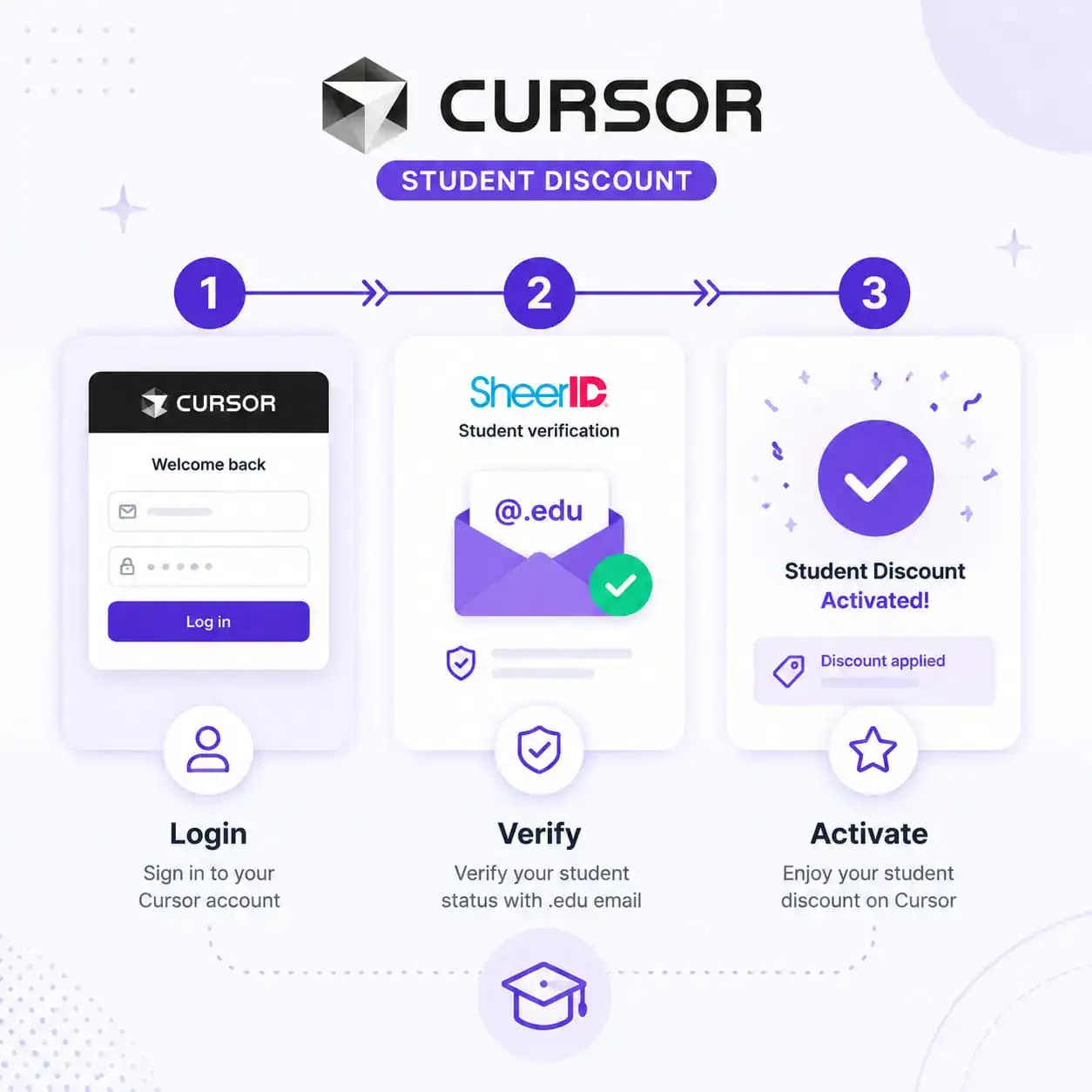
You need two things: a valid .edu email address and successful identity verification through SheerID [1][4].
Eligibility requirements:
- Currently enrolled at an accredited university or college
- Access to a .edu email address (or equivalent institutional email)
- Ability to pass SheerID student verification
- Must be 18 years or older (standard terms of service)
Who doesn’t qualify:
- High school students
- Bootcamp participants (unless the bootcamp is part of an accredited institution)
- Alumni who no longer have active .edu accounts
- Students at institutions not recognized by SheerID’s database
Edge case for international students: If your university doesn’t issue .edu emails, you may still qualify. Forum posts and reports indicate that international students can submit enrollment documentation directly to SheerID for manual verification [9][7]. However, availability varies by country, and some regions (like Vietnam) have reported limited support [9].
Step-by-Step: How to Claim Your Free Year of Cursor Pro
The process takes about 5 minutes if your .edu email is active and your institution is in SheerID’s database [3][6].
Step 1: Go to the Cursor Students page Visit cursor.com/students directly. Don’t look for the discount through the regular pricing page—it’s a separate enrollment flow [2].
Step 2: Log in or create an account Use your .edu email address. If you already have a Cursor account with a personal email, you may need to create a new account or contact support to link your student status.
Step 3: Complete SheerID verification Enter your school name, enrollment status, and personal details. SheerID checks this against institutional databases. Approval is usually instant [3].
Step 4: Activate Pro Once verified, your account upgrades to Cursor Pro immediately. You’ll see the Pro badge in your settings, and your 12-month countdown begins [6].
Common mistake: Don’t use a forwarding alias. Some students set up .edu forwarding to Gmail—use the actual .edu address during signup to avoid verification failures.
What Happens After Your Free Year Ends?
Your account reverts to the free Hobby tier unless you manually subscribe to Pro at $20/month [7].
Your options at expiration:
- Renew the student discount if you’re still enrolled (documentation required for renewal) [7]
- Subscribe to Pro at $20/month or $192/year (annual billing saves 20%)
- Downgrade to Hobby and keep using Cursor with limited AI requests
- Switch to an alternative like GitHub Copilot or Windsurf
GetAIPerks reports that students can renew “indefinitely while enrolled” with updated documentation [7]. However, Cursor hasn’t published an official policy on maximum renewals, so treat this as renewable year-by-year rather than guaranteed.
How Does Cursor’s Student Deal Compare to Alternatives?
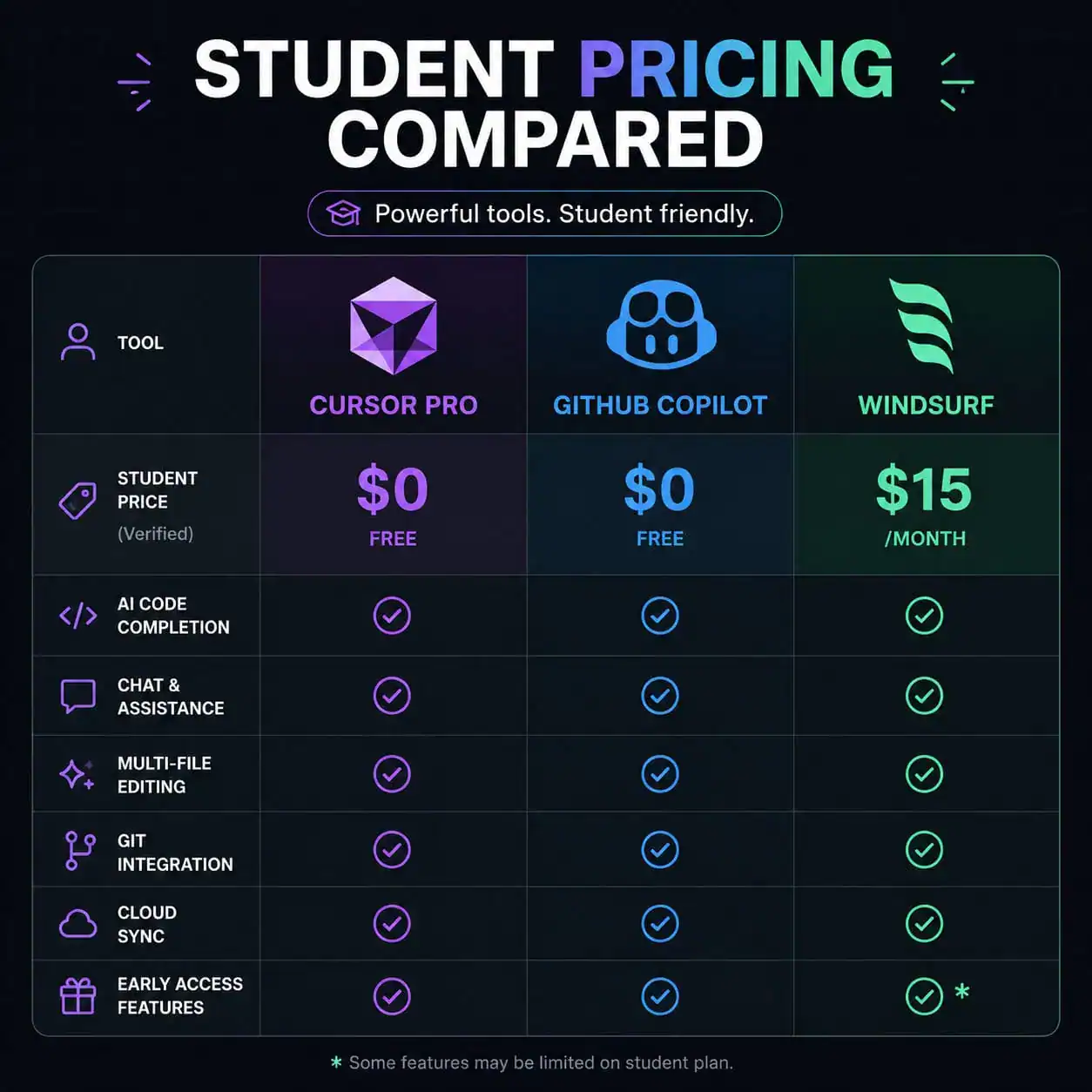
Here’s how the major AI coding tools stack up for students in 2026:
| Tool | Student Price | Retail Price | IDE Type | Key Limitation |
|---|---|---|---|---|
| Cursor Pro | Free (1 year) | $20/month | Standalone (VS Code fork) | 500 fast requests/month |
| GitHub Copilot | Free (while enrolled) | $10/month | Extension (any IDE) | Less advanced chat/editing |
| Windsurf Pro | $15/month (no student plan) | $15/month | Standalone | No student discount |
| Cline | Free (API costs separate) | Free | Extension | Pay per API call |
| Google Antigravity | Free (limited availability) | Free | Browser-based | Regional restrictions |
Choose Cursor if you want the most powerful AI-assisted editing experience in a dedicated IDE and you have a .edu email.
Choose GitHub Copilot if you prefer staying in VS Code, IntelliJ, or another existing IDE without switching editors.
Choose Cline if you want zero subscription costs and don’t mind paying per API call (often cheaper for light usage).
For students building web projects alongside their coding work, tools like Figma for UI/UX design and no-code website builders complement Cursor well for full-stack learning.
Is the Cursor Student Discount Worth Claiming?
Yes, without question. At $240 in value for zero cost, it’s the strongest student offer in AI coding tools right now [10]. GamsGo called it the “standout free option” in their April 2026 analysis, noting that comparable programs (like ChatGPT’s student pilot) have already ended [10].
Reasons to claim immediately:
- No credit card required during the free year
- Full Pro features with no artificial limitations beyond standard request caps
- The program could change or end without notice (it’s not contractually guaranteed)
- You build familiarity with AI-assisted coding early in your career
One honest caveat: Cursor’s credit-based system means you might hit usage limits during intense project weeks. If you burn through 500 fast requests mid-month, you’ll fall back to slower models until the cycle resets. For most students, this is fine. For those doing heavy AI-assisted development daily, it’s worth knowing.
If you’re interested in how AI tools are reshaping creative workflows beyond coding, check out our overview of AI-powered content optimization and AI graphic design tools.
Troubleshooting Common Issues
“My school isn’t in the SheerID database” Contact SheerID support directly with your enrollment letter. They can manually verify students from institutions not yet in their system [9].
“I already have a Cursor account with my personal email” You’ll likely need to create a separate account with your .edu email. Cursor support may be able to merge accounts, but this isn’t guaranteed.
“Verification keeps failing” Make sure you’re entering your legal name exactly as it appears in your school’s records. Mismatches (nicknames, middle names) are the most common cause of SheerID rejections.
“I’m a part-time student” Part-time enrollment at an accredited institution still qualifies in most cases, as long as SheerID can verify your status.

Tips for Maximizing Your Free Year
Once you’ve claimed your discount, make the most of those 12 months:
- Learn the keyboard shortcuts — Cursor’s AI features are fastest when triggered via shortcuts rather than menus
- Use the AI chat for learning — Ask it to explain code, not just write it
- Import your VS Code extensions — Cursor supports the VS Code marketplace, so bring your existing setup
- Track your usage — Monitor your fast request count in settings to avoid mid-month slowdowns
- Export your settings before expiration — If you decide not to renew, your preferences transfer back to VS Code easily
For students working on web design projects, Figma’s AI workflow automation pairs well with Cursor for full design-to-code pipelines. And if you’re building WordPress sites as part of coursework, our WordPress AI plugin guide covers complementary tools.
Conclusion
Cursor AI’s student discount remains one of the best deals available for students learning to code in 2026. A free year of Pro access worth $240, verified in minutes through your .edu email, with no credit card required. The program is active, the verification process is straightforward, and the tool itself is genuinely useful for coursework, side projects, and building real development skills.
Your next steps:
- Visit cursor.com/students with your .edu email ready
- Complete SheerID verification (takes under 5 minutes)
- Start using Pro features immediately
- Set a calendar reminder for 30 days before expiration to decide on renewal
Don’t wait on this. Student programs can change or end without warning, and there’s no downside to claiming it now even if you’re not sure you’ll use it heavily right away.
FAQ
Is the Cursor AI student discount still available in 2026? Yes. As of May 2026, the program is active and offering one free year of Cursor Pro to verified students [5][7].
Do I need a .edu email to qualify? A .edu email is the standard requirement. International students without .edu addresses may qualify through manual SheerID verification with enrollment documents [9].
Can I use the student discount if I already have a free Cursor account? You’ll likely need to create a new account with your .edu email or contact Cursor support to apply the student status to your existing account.
What happens when my free year expires? Your account drops to the free Hobby tier. You can renew with proof of continued enrollment or subscribe at $20/month [7].
Is there a Cursor AI discount code I can use instead? No. There are no public discount codes for Cursor. The student program is the only way to get Pro for free [7].
Can high school students get the discount? No. The program requires enrollment at an accredited university or college, verified through SheerID [1].
How many fast requests do I get with the student Pro plan? You get the full Pro allocation: 500 fast premium requests per month, plus unlimited slow requests [2].
Can I renew the student discount for a second year? Reports indicate renewal is possible with updated enrollment documentation, though Cursor hasn’t published an official renewal policy [7].
Is Cursor better than GitHub Copilot for students? Cursor offers a more integrated AI editing experience as a standalone IDE. Copilot is better if you prefer working inside VS Code or another editor without switching. Both are free for students.
Does the student plan include team features? No. The student discount applies to individual Pro accounts only, not Business or team plans [1].
References
[1] Student Discount – https://cursor.com/help/account-and-billing/student-discount [2] Students – https://cursor.com/students [3] Watch – https://www.youtube.com/watch?v=7pgH_LHJhbA [4] Cursor Free For Students – https://sealos.io/blog/cursor-free-for-students/ [5] forum.cursor – https://forum.cursor.com/t/is-the-1-year-student-subscription-still-available/149573 [6] Unlock Cursor Pro Student Free – https://lilys.ai/en/notes/cursor-ai-browser-20251119/unlock-cursor-pro-student-free [7] Cursor Free Credits Guide 2026 – https://www.getaiperks.com/en/ai/cursor-free-credits-guide-2026 [9] forum.cursor – https://forum.cursor.com/t/request-to-extend-student-discount-to-additional-countries-or-universities/125379 [10] Cursor Pro Free – https://www.gamsgo.com/blog/cursor-pro-free