Last updated: May 7, 2026
Quick Answer: n8n is an open-source, node-based workflow automation platform that lets you connect apps, automate repetitive tasks, and build AI-powered workflows without writing much code. It supports both self-hosting and cloud deployment, integrates with hundreds of services, and offers over 2,000 ready-to-use templates. Whether you’re a solo developer or part of a growing team, mastering n8n can dramatically cut the time you spend on manual, repetitive processes.
Key Takeaways
- n8n is free and open-source, with a self-hosted option that gives you full data control and a managed cloud plan for convenience.
- Workflows are built on a visual canvas using nodes, where each node is one step and connections show how data moves between them. [1]
- You can extend any workflow with custom JavaScript, making n8n more flexible than most no-code tools.
- n8n’s AI agent nodes go beyond simple text generation — they can plan, use tools, and complete multi-step tasks autonomously. [3]
- A community repository holds over 2,000 workflow templates you can import and adapt immediately. [2]
- Common use cases include email automation, CRM syncing, social media scheduling, e-commerce triggers, and database updates.
- n8n competes directly with Zapier and Make (formerly Integromat), but stands out on cost at scale and self-hosting flexibility.
- Beginners can build useful workflows in under an hour; advanced users can build complex, branching, AI-driven pipelines.
What Exactly Is n8n and Who Should Use It?
n8n (pronounced “n-eight-n” or “nodemation”) is an open-source workflow automation platform that connects apps and services through a visual, node-based interface. It’s built for developers, technical marketers, operations teams, and anyone who regularly moves data between tools manually.
Who benefits most from n8n:
- Developers and DevOps engineers who want automation without vendor lock-in
- Small business owners managing CRM, email, and e-commerce workflows
- Marketing teams automating lead nurturing, social posting, and reporting
- Agencies building client automation systems they can host and control
- Data teams syncing databases, APIs, and spreadsheets on a schedule
Who might find it less suitable:
- Non-technical users who want a completely point-and-click experience with zero learning curve (tools like Zapier may be a better starting point)
- Teams that need enterprise-grade support contracts out of the box without any setup
n8n combines a drag-and-drop interface with optional JavaScript for custom logic, so it sits between fully no-code tools and traditional scripting. [4] If you’ve ever wished Zapier let you write a bit of code when needed, n8n is probably what you’re looking for.
How Does n8n’s Node-Based Architecture Work?
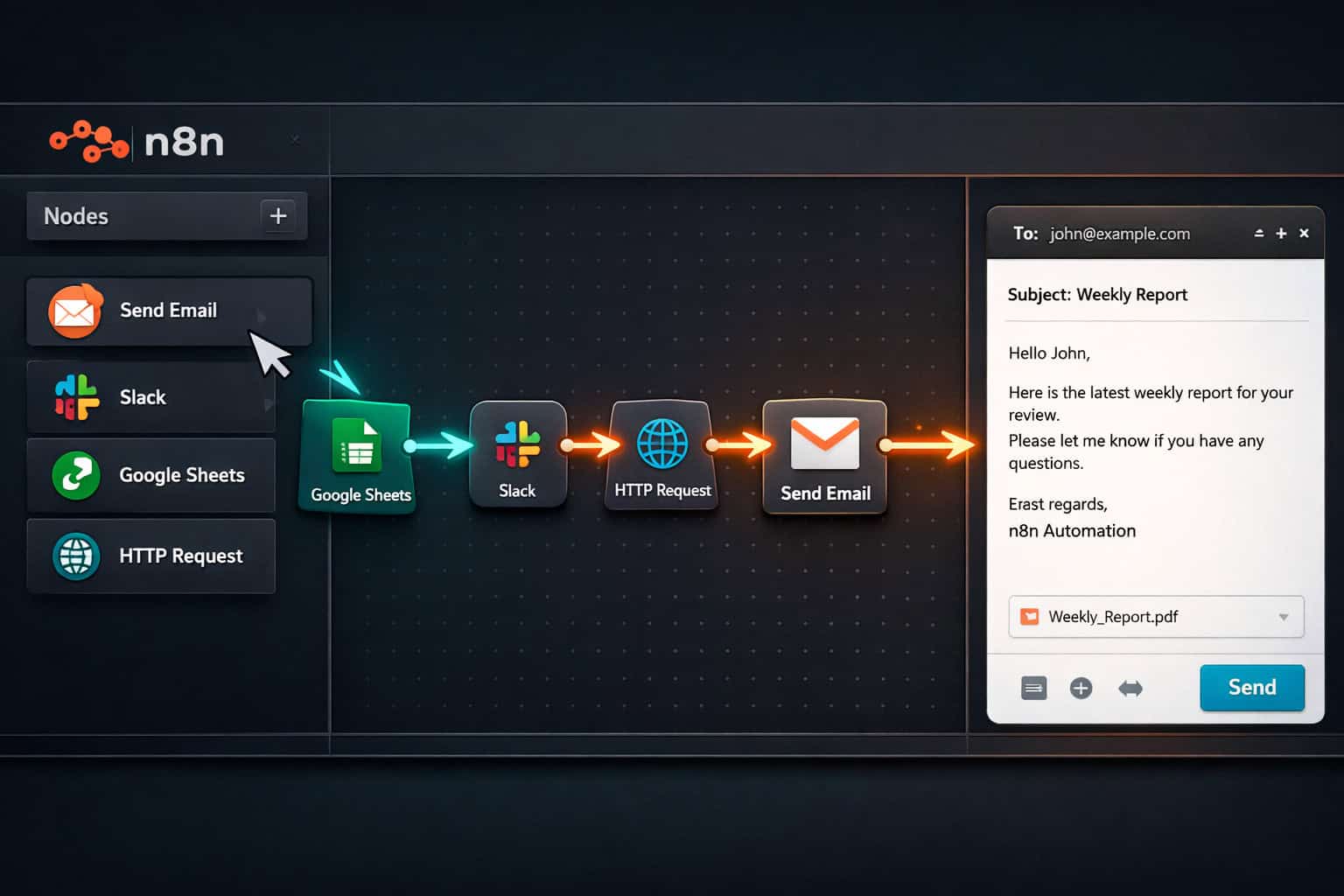
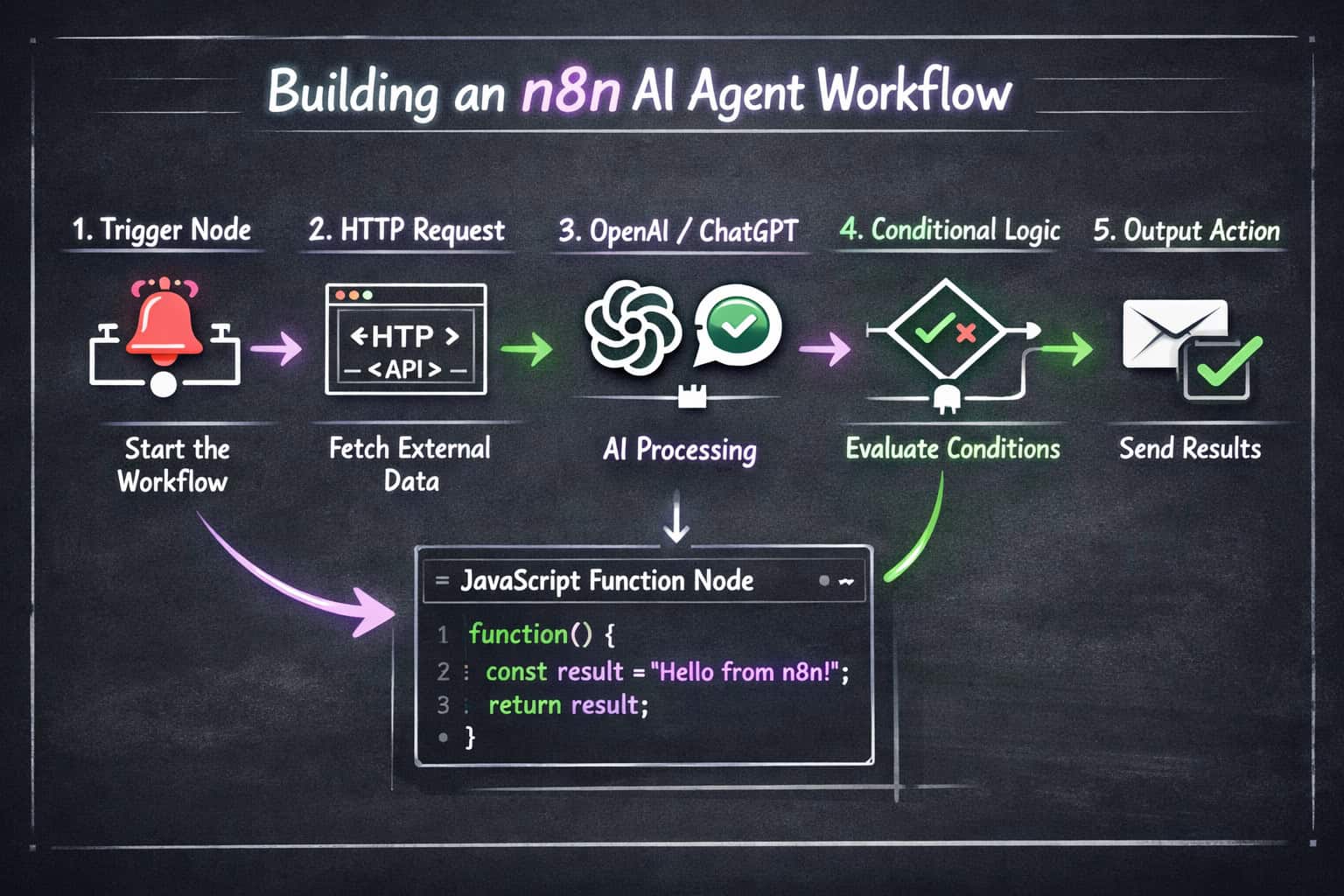
Every n8n workflow is a canvas of connected nodes. Each node does one job — trigger an event, fetch data, transform it, or send it somewhere. Lines between nodes show the path data takes. [1]
The three core node types:
| Node Type | What It Does | Example |
|---|---|---|
| Trigger nodes | Start the workflow | Webhook, Cron schedule, email received |
| Action nodes | Do something with data | Send Slack message, update Google Sheet |
| Logic nodes | Control flow | IF condition, Switch, Merge, Loop |
How data flows:
- A trigger fires (e.g., a new row appears in a Google Sheet).
- Data passes to the next node as a JSON object.
- Each subsequent node reads, transforms, or routes that data.
- The final node delivers the output (email sent, record created, API called).
💡 Quick example: A webhook receives a form submission → an IF node checks if the user selected “Enterprise” → if yes, it creates a HubSpot deal and sends a Slack alert to sales; if no, it adds the contact to a Mailchimp list.
One of the most useful features is the ability to inspect the exact data output of any node during testing. You can click a node, run it, and see the JSON it produced. This makes debugging fast and concrete. [9]
Self-Hosted vs. Cloud: Which n8n Setup Is Right for You?
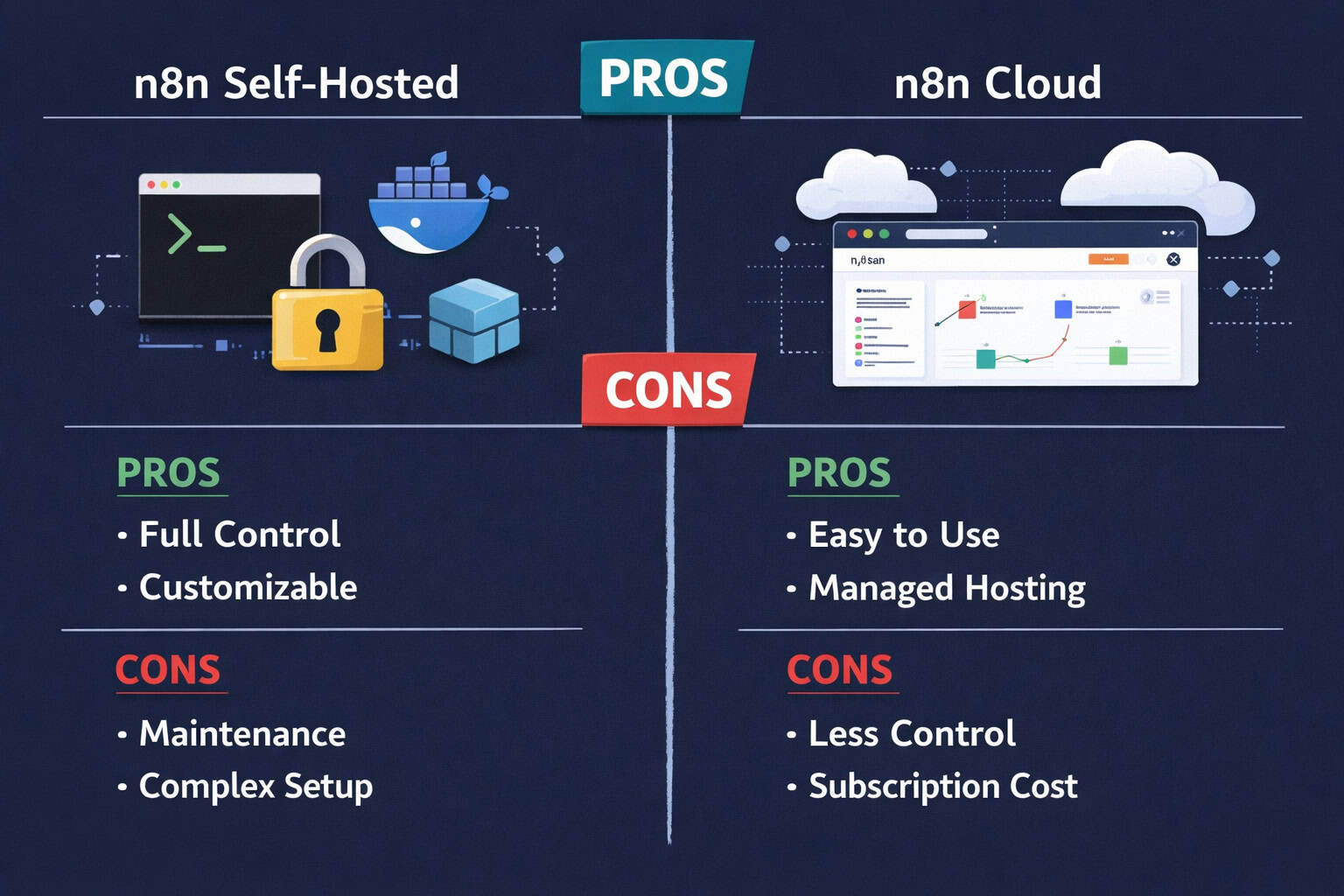
n8n gives you two deployment paths: self-host it on your own server or use n8n’s managed cloud service. The right choice depends on your technical comfort, data requirements, and budget.
Self-hosting means installing n8n on a VPS, a local machine, or via Docker. You control everything — data stays on your infrastructure, you can install community nodes, and there are no per-workflow execution limits tied to a pricing tier. [4]
n8n Cloud is the managed option. You sign up, log in, and start building. No server setup required. It’s ideal for teams that want to move fast without managing infrastructure.
Side-by-side comparison:
| Factor | Self-Hosted | n8n Cloud |
|---|---|---|
| Cost | Server costs only (~$5–20/mo VPS) | Subscription from ~$20/mo |
| Setup time | 30–60 minutes (Docker recommended) | Under 5 minutes |
| Data control | Full — stays on your server | Managed by n8n |
| Custom nodes | Yes | Limited |
| Maintenance | You handle updates | Handled for you |
| Execution limits | None (hardware-bound) | Plan-dependent |
Choose self-hosting if you handle sensitive data, want unlimited executions, or need community/custom nodes.
Choose n8n Cloud if you want zero server maintenance and are comfortable with a subscription model.
For teams already managing WordPress or web infrastructure, self-hosting n8n on the same VPS is often the most cost-efficient path. If you’re exploring broader automation strategies for web projects, the Automation Archives on WebAiStack cover complementary tools worth reviewing.
Getting Started: Building Your First n8n Workflow
Building your first workflow in n8n takes less time than most people expect. Here’s a practical, step-by-step path from zero to a working automation.
Step 1: Install or access n8n
- Cloud: Sign up at n8n.io and create a workspace.
- Self-hosted: Run
docker run -it --rm --name n8n -p 5678:5678 n8nio/n8nin your terminal.
Step 2: Create a new workflow
- Click “New Workflow” from the dashboard.
- You’ll see a blank canvas with a “+” button to add your first node.
Step 3: Add a trigger node
- For beginners, start with a Manual Trigger (run on demand) or a Schedule Trigger (run every X minutes/hours).
Step 4: Add an action node
- Click the “+” after your trigger and search for a service (Gmail, Slack, Airtable, etc.).
- Authenticate the service using OAuth or an API key.
- Configure what the node should do (e.g., “Send email to [email]”).
Step 5: Test and activate
- Click “Execute Workflow” to test with real data.
- Check each node’s output panel to confirm data looks right.
- Toggle the workflow to “Active” so it runs automatically.
Common beginner mistake: Skipping the test step and activating immediately. Always run a test execution first — n8n shows you exactly where a workflow breaks and what data caused the issue.
If you’re also automating content publishing, pairing n8n with strategies from this guide on how to auto-share WordPress blog posts to social media can save hours each week.
What Are the Most Useful n8n Workflow Templates?
A community repository contains over 2,000 ready-to-use n8n workflow templates covering dozens of categories. [2] Instead of building from scratch, you can import a template and customize it in minutes.
Top categories with high practical value:
- 📧 Email automation — auto-reply systems, lead follow-up sequences, inbox triage
- 📊 Data sync — Google Sheets to Notion, Airtable to CRM, database backups
- 🛒 E-commerce — Shopify order notifications, abandoned cart alerts, inventory updates
- 📣 Social media — schedule posts, monitor mentions, cross-post content
- 🤖 AI workflows — summarize emails with GPT, classify support tickets, generate content drafts
- 🔔 Monitoring & alerts — uptime checks, error notifications, API health monitoring
How to find and use templates:
- Visit the n8n template library at
n8n.io/workflows - Search by use case or app name
- Click “Use this workflow” to import it directly into your instance
- Update credentials and adjust node settings for your accounts
- Test before activating
The Milvus community blog highlighted one open-source repository that specifically aggregates high-efficiency templates — worth bookmarking if you’re building at scale. [2]
For teams that also want to automate AI-driven content tasks, pairing n8n with insights from this practical guide to AI-powered content optimization gives you a strong combined strategy.
How Do n8n AI Agents Work (and How Are They Different from LLMs)?
n8n’s AI agent nodes are one of its most powerful features in 2026. The distinction matters: an LLM node generates text based on a prompt, while an AI agent node can plan, decide, use tools, and complete multi-step tasks on its own. [3]
LLM node: You give it a prompt, it returns text. That’s the full scope.
AI agent node: You give it a goal. It decides which tools to use, calls them in sequence, evaluates results, and keeps working until the goal is met or it hits a limit.
What tools can an n8n AI agent use?
- HTTP Request (call any external API)
- Code execution (run JavaScript)
- Database queries
- File read/write
- Any other n8n node you expose as a tool
Practical AI agent example:
A support ticket arrives via webhook → the AI agent reads the ticket → searches your knowledge base via HTTP → drafts a reply using GPT-4 → checks if the draft matches a confidence threshold → if yes, sends the reply automatically; if no, flags it for human review.
This is the kind of workflow that used to require a custom-coded application. With n8n’s agent framework, you can build it visually with a few nodes. [3]
The book Mastering n8n: The Complete Guide to Workflow Automation by Amjid Ali covers AI integration with OpenAI and ChatGPT in depth, including how to structure agent prompts for reliable, production-ready results. [5]
For more on AI-driven automation approaches, the comprehensive guide to AI-powered content generation tools on WebAiStack covers complementary strategies worth exploring.
How Does n8n Compare to Zapier and Make?
n8n, Zapier, and Make (formerly Integromat) all automate workflows by connecting apps, but they serve different users at different price points.
The short version: Zapier is easiest for non-technical users. Make offers more complex logic at a lower price than Zapier. n8n wins on cost at scale, self-hosting, and developer flexibility.
| Feature | n8n | Zapier | Make |
|---|---|---|---|
| Open-source | ✅ Yes | ❌ No | ❌ No |
| Self-hosting | ✅ Yes | ❌ No | ❌ No |
| Free tier | ✅ Self-host free | Limited (100 tasks/mo) | Limited (1,000 ops/mo) |
| Custom code | ✅ JavaScript nodes | ❌ No | Limited |
| AI agent support | ✅ Native | Limited | Limited |
| Learning curve | Medium | Low | Medium |
| Cost at scale | Low (self-host) | High | Medium |
Choose n8n if:
- You need to run thousands of executions per month without per-task fees
- You want to self-host for data compliance reasons
- Your team includes at least one developer comfortable with JSON and APIs
Choose Zapier if:
- Your team is non-technical and needs the simplest possible setup
- You need a specific app integration that only Zapier supports
Choose Make if:
- You want more visual logic control than Zapier but don’t want to self-host
What Are the Most Common n8n Mistakes (and How to Avoid Them)?
Even experienced automation builders run into predictable problems with n8n. Here are the ones that cause the most lost time.
Mistake 1: Not handling errors By default, a failed node stops the entire workflow. Use the “Error Trigger” node and “Continue on Fail” settings to build workflows that log errors and keep running when one step fails.
Mistake 2: Hardcoding credentials in nodes Always use n8n’s built-in Credentials manager instead of pasting API keys directly into node fields. This keeps secrets secure and makes credential rotation much easier.
Mistake 3: Ignoring execution history n8n logs every execution. Regularly reviewing failed executions (under “Executions” in the sidebar) catches silent failures before they become real problems.
Mistake 4: Building overly long single workflows A workflow with 40+ nodes becomes hard to debug and maintain. Break complex processes into sub-workflows and call them using the “Execute Workflow” node. This mirrors good software architecture principles.
Mistake 5: Not pinning test data When testing, pin the output of your trigger node so you can re-run the same test data repeatedly without needing a new real trigger event. This saves significant time during development.
Edge case to watch: When processing large datasets with a “Split in Batches” node, be careful with rate limits on downstream APIs. n8n doesn’t automatically throttle requests — you may need to add a “Wait” node between batches.
For teams running n8n alongside WordPress automation, the advanced WordPress strategies for power users guide covers complementary patterns that work well with n8n-triggered workflows.
How to Scale n8n for Production Use
Scaling n8n beyond personal projects requires a few deliberate architectural decisions. The platform handles production workloads well, but only if you set it up correctly from the start.
Key steps for production-ready n8n:
- Use a queue mode setup — Run n8n with a Redis queue and separate worker processes. This prevents a single heavy workflow from blocking others.
- Connect an external database — Replace the default SQLite with PostgreSQL for better performance and reliability under load.
- Set up proper logging — Forward execution logs to a monitoring tool (Datadog, Grafana, or even a simple webhook to Slack).
- Version control your workflows — Export workflows as JSON and store them in Git. This gives you rollback capability and audit history.
- Use environment variables — Store all configuration (database URLs, API keys, webhook base URLs) as environment variables, not hardcoded values.
- Monitor execution queues — Watch for queue buildup, which signals that your worker count is too low for the current load.
💡 Scaling rule of thumb: For most small-to-medium businesses, a single n8n instance on a 2-core, 4GB RAM VPS handles hundreds of daily workflow executions comfortably. Add workers when average execution time starts increasing.
If your automation stack also includes WordPress plugins or site management tasks, the 12 best AI plugins for WordPress to automate website management article pairs well with n8n-based backend automation.
Mastering n8n: The Ultimate Guide to Streamlining Your Workflow Automation — FAQ
Q: Is n8n really free? Yes. The self-hosted version of n8n is free under a fair-code license. You pay only for the server you run it on. The cloud-hosted version has a paid subscription starting around $20/month (pricing may vary — check n8n.io for current plans).
Q: Do I need to know how to code to use n8n? No, but basic familiarity with JSON and APIs helps significantly. Most workflows can be built without writing any code. JavaScript is optional for advanced logic. [4]
Q: How many apps does n8n integrate with? n8n has over 400 built-in integrations (called nodes) and supports any HTTP API via the generic HTTP Request node, which effectively means unlimited integrations.
Q: Can n8n replace Zapier completely? For most technical users, yes. n8n covers the same core use cases, often at lower cost, with more flexibility. The main gap is that a small number of niche app integrations exist only in Zapier’s ecosystem.
Q: What’s the difference between a workflow and a sub-workflow in n8n? A workflow is a standalone automation. A sub-workflow is a workflow called by another workflow using the “Execute Workflow” node. Sub-workflows let you reuse logic across multiple parent workflows without duplicating nodes.
Q: How do I handle sensitive data in n8n? Use n8n’s Credentials manager for API keys and OAuth tokens. For self-hosted instances, encrypt your database and restrict access to the n8n port at the firewall level. Avoid logging sensitive field values in node outputs.
Q: Can n8n run on a schedule? Yes. The Schedule Trigger node supports cron expressions, so you can run workflows every minute, hourly, daily, on specific days, or any custom interval.
Q: What is the n8n “Execute Workflow” node used for? It calls another n8n workflow and waits for its result. This is the primary way to build modular, reusable automation components — similar to calling a function in code.
Q: Is there a visual way to learn n8n workflows? Yes. The official n8n YouTube channel and the book Mastering n8n by Amjid Ali both provide structured, visual learning paths covering everything from basic nodes to AI agent deployment. [5]
Q: How does n8n handle workflow errors in production? You can configure an “Error Workflow” that triggers automatically when any other workflow fails. This lets you send alerts, log errors, or attempt retries without manual intervention.
Conclusion: Your Next Steps for Mastering n8n
Mastering n8n: The Ultimate Guide to Streamlining Your Workflow Automation comes down to one core principle — start small, test everything, and build complexity gradually. The platform rewards hands-on experimentation more than any amount of reading.
Here’s a practical action plan to get started today:
- Install n8n — Use Docker for self-hosting or sign up for n8n Cloud if you want zero setup.
- Build one simple workflow this week — Pick a repetitive task you do manually (forwarding emails, updating a spreadsheet, posting to Slack) and automate it.
- Explore the template library — Browse the 2,000+ templates at n8n.io/workflows and import one that matches a real need.
- Add one AI node — Once comfortable with basic workflows, add an OpenAI node to summarize, classify, or generate content as part of a larger automation.
- Read or watch structured learning material — The Mastering n8n book by Amjid Ali and the official n8n documentation are both solid resources for going deeper. [5][3]
- Join the community — The n8n community forum is active and genuinely helpful for troubleshooting edge cases.
The gap between “doing things manually” and “having a system that does them for you” is smaller than most people think. With n8n, that gap closes one workflow at a time.
For more automation strategies and web workflow guides, explore the full Automation Archives on WebAiStack.
References
[1] Workflows — https://docs.n8n.io/workflows/ [2] I Discovered This N8n Repo That Actually 10xd My Workflow Automation Efficiency — https://milvus.io/blog/i-discovered-this-n8n-repo-that-actually-10xd-my-workflow-automation-efficiency.md [3] Intro Tutorial — https://docs.n8n.io/advanced-ai/intro-tutorial/ [4] N8n Workflow Automation — https://www.helloroketto.com/articles/n8n-workflow-automation [5] Mastering n8n Book Launch — https://www.youtube.com/watch?v=UB0w0vuyMw4 [9] Pixeljets n8n Guide — https://pixeljets.com/blog/n8n/