
Last updated: May 11, 2026This article provides the complete Cursor AI Pricing Guide Free vs Pro vs Business Plans so you can choose the best option for your needs.
Quick Answer
Cursor AI offers three pricing tiers: a free Hobby plan, a $20/month Pro plan for individual developers, and a $40/user/month Business plan for teams [1]. The Pro plan is where most developers land, giving access to fast premium model requests, multi-file editing via Composer, and the AI agent mode that sets Cursor apart from competitors like GitHub Copilot ($10/month) and Windsurf ($15/month) [3][5].
Key Takeaways
- Free tier includes 2,000 code completions and 50 slow premium requests per month — enough to test the editor thoroughly [1]
- Pro at $20/month unlocks unlimited completions, 500 fast premium requests, and full Composer/Agent access [1][3]
- Business at $40/user/month adds admin controls, centralized billing, SAML SSO, and enterprise model access controls [1][2]
- Cursor reached $2B ARR by early 2026 and has over 1 million daily users, including teams at Stripe and Figma [10]
- GitHub Copilot costs half as much ($10/month) but lacks Cursor’s full IDE integration and multi-file editing [3][5]
- Overages on premium requests can add $4-$44/month if you exceed your allocation [4][5]
- Cursor 3 (April 2026) introduced parallel cloud agents and multi-workspace support, reducing common task times significantly [9]
- Enterprise spend limits and model blocklists were added in May 2026 to prevent billing surprises [2]
What Does Cursor AI Cost in 2026?
Cursor’s pricing structure has three distinct tiers designed for different developer needs. Here’s the breakdown as of 2026:

| Feature | Hobby (Free) | Pro ($20/mo) | Business ($40/user/mo) |
|---|---|---|---|
| Code completions | 2,000/month | Unlimited | Unlimited |
| Premium requests (fast) | 50 (slow only) | 500 | 500 |
| Composer (multi-file) | Limited | Full access | Full access |
| Agent mode | No | Yes | Yes |
| Model switching | No | Yes | Yes |
| Admin dashboard | No | No | Yes |
| SAML SSO | No | No | Yes |
| Spend limits/alerts | No | No | Yes |
| Privacy mode | No | Optional | Enforced |
Source: Cursor official pricing page [1] and UI Bakery analysis [2]
Choose Free if you’re evaluating Cursor or code fewer than 10 hours per week. Choose Pro if you’re a full-time developer working solo or on small teams. Choose Business if you manage a team and need centralized billing, compliance controls, or enforced privacy mode.
A common mistake: developers start on Free, hit the 50-request limit in a day, then feel forced to upgrade without understanding what they’re actually getting. The Pro plan’s 500 fast requests reset monthly, and each additional request beyond that costs roughly $0.04 [4][5].
How Do Premium Requests and Overages Work?
Premium requests are the core currency of Cursor’s pricing model. Each time you use a fast AI model (like GPT-4 or Claude) for chat, Composer edits, or Agent tasks, it consumes one premium request [2][3].
Here’s what catches people off guard:
- 500 fast requests/month on Pro sounds generous, but heavy Agent mode usage can burn through them in 1-2 weeks
- Once you exceed 500, you can either wait for slow requests or pay per additional fast request
- Overages have been reported as high as $44/month for power users before Cursor introduced soft spend limits [5][4]
The fix: In May 2026, Cursor rolled out soft spend limits and usage alerts for Business plans, letting admins set thresholds and get notified before costs spike [2]. Pro users can now also track their usage more granularly in settings.
Decision rule: If you regularly exceed 500 requests, consider whether you’re using Agent mode efficiently. Many developers find that batching related changes into single Composer sessions (rather than many small requests) reduces consumption by 30-40%.
For teams exploring AI-powered development tools more broadly, our comprehensive guide to AI-powered content generation tools covers how these pricing models compare across the AI tool landscape.
How Does Cursor Compare to GitHub Copilot and Windsurf?
This is the question most developers ask before committing. Here’s a direct comparison based on current pricing and capabilities:
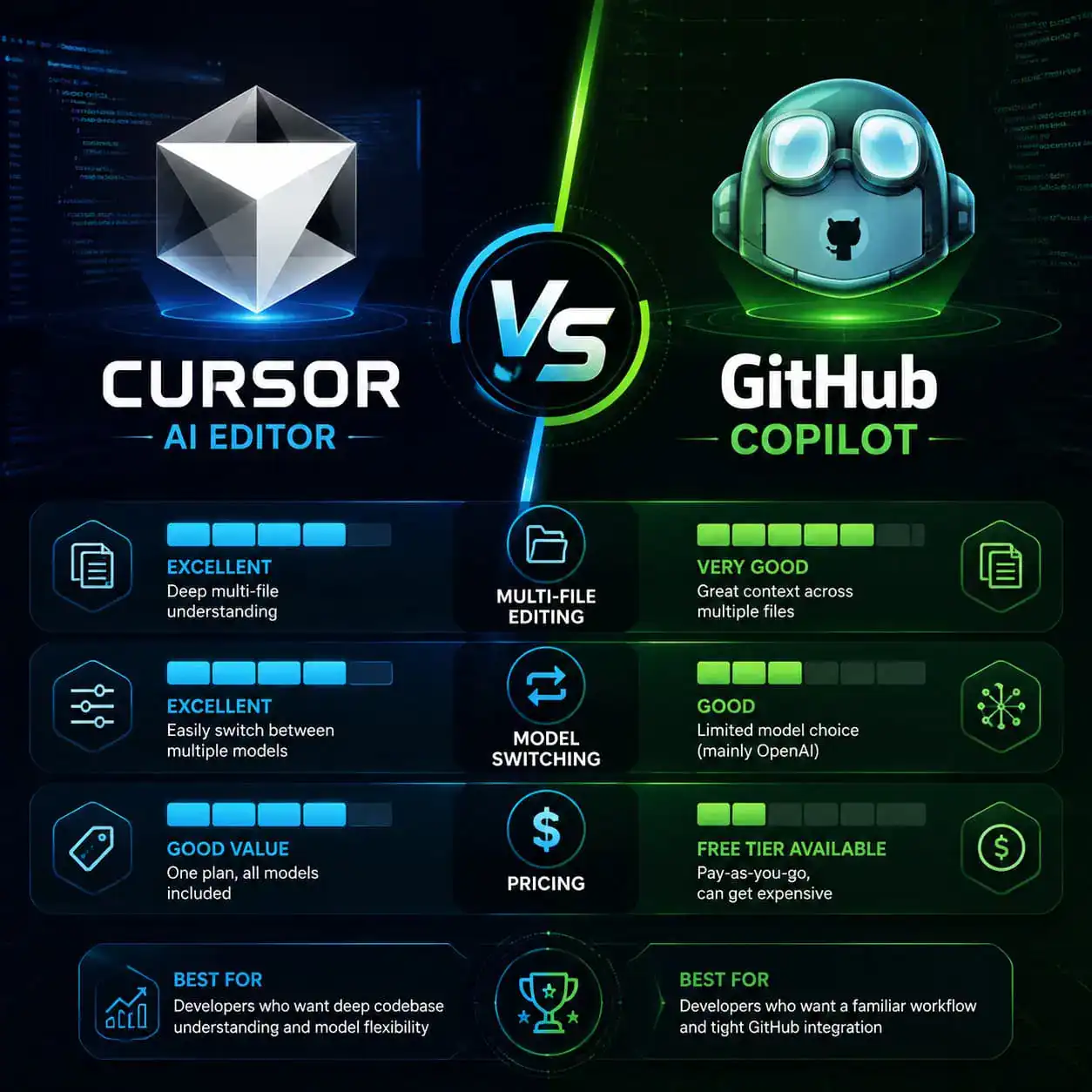
| Criteria | Cursor Pro | GitHub Copilot Individual | Windsurf Pro |
|---|---|---|---|
| Monthly cost | $20 | $10 | $15 |
| Team cost/user | $40 | $19 | $30 |
| Full IDE | Yes (fork of VS Code) | No (extension only) | Yes (standalone) |
| Multi-file editing | Composer | Limited | Cascade |
| Agent mode | Yes (with Subagents) | Yes (Copilot Workspace) | Yes |
| Model switching | GPT-4, Claude, custom | GPT-4 only | Multiple |
| Background agents | Yes (Cursor 3) | No | No |
| Unlimited completions | Pro+ | All paid tiers | Free tier |
Sources: [3][5][1]
Choose Cursor if you want the most powerful multi-file editing, model flexibility, and are willing to pay the premium. Choose Copilot if budget matters most and you primarily need inline completions within your existing VS Code setup. Choose Windsurf if you’re newer to AI coding and want a gentler learning curve at a mid-range price.
Many developers actually run both Copilot and Cursor together for $30/month total — using Copilot for quick inline suggestions and Cursor’s Composer for larger refactoring tasks [3].
If you’re building websites and want to understand how AI tools fit into broader development workflows, check out our guide on AI website creation without code.
What’s New in Cursor 3 That Affects Pricing Value?
Cursor 3 launched on April 2, 2026, and significantly changed the value proposition of the Pro and Business tiers [9]. The key additions:
- Parallel cloud agents that run tasks in the background, producing demos and screenshots without blocking your main workflow
- Multi-workspace support so you can manage multiple projects simultaneously
- Subagents (introduced in v2.4) that handle subtasks autonomously within a larger Agent session
- PR review experience (v3.3, May 2026) for handling pull requests from creation to merge in one place [2]
These features mean the $20/month Pro plan delivers considerably more than it did even six months ago. One developer reported that file conversion tasks dropped from 17 minutes to 9 minutes with parallel agents [9].
Edge case to watch: Background agents consume premium requests. If you run multiple agents simultaneously, you can burn through your 500 monthly allocation faster than expected. Monitor your usage dashboard weekly.
The SpaceX partnership announced in April 2026 — which includes a potential $60 billion acquisition option — signals that Cursor’s enterprise features will likely expand significantly in coming months [7]. This could mean new enterprise tiers or pricing changes.
For developers working on design-to-code workflows, Cursor pairs well with tools covered in our Figma to code plugin guide.
Who Should (and Shouldn’t) Pay for Cursor Pro?
Cursor Pro makes sense for:
- Full-time developers writing code 20+ hours per week
- Anyone doing frequent multi-file refactoring or large codebase navigation
- Developers who want to switch between AI models (Claude for reasoning, GPT-4 for generation)
- Teams already using VS Code who want a drop-in replacement with AI built in
Cursor Pro probably isn’t worth it for:
- Hobbyist coders who write less than 10 hours per week (Free tier covers this)
- Developers locked into JetBrains IDEs who can’t switch editors
- Teams that only need inline completions (Copilot at $10/month is cheaper for this)
- Organizations with strict data residency requirements that Cursor’s privacy mode doesn’t satisfy

Common mistake: Signing up for Business ($40/user) when your team doesn’t actually need admin controls or SSO. The Pro plan works fine for small teams of 2-5 developers who trust each other to manage their own usage.
If you’re evaluating broader no-code and AI development platforms, our roundup of 11 best no-coding website design platforms for 2026 provides useful context on where Cursor fits in the ecosystem.
How to Reduce Cursor AI Costs Without Losing Productivity
Five practical strategies based on real user feedback and Finout’s 2026 analysis [4]:
Batch your Composer sessions — Instead of making 10 small requests, describe the full scope of changes in one prompt. This can cut request usage by 40%.
Use slow requests for non-urgent tasks — Code reviews, documentation generation, and test writing don’t need fast responses. Switch to slow mode and save your fast allocation.
Set up soft spend limits (Business plans) — Configure alerts at 80% usage so you’re never surprised by overages [2].
Leverage Tab completions heavily — These are unlimited on Pro and don’t count against premium requests. Train yourself to accept Tab suggestions before reaching for Chat or Composer.
Review your model choices — Claude Sonnet is cheaper per request than Claude Opus. Use the most capable model only when you genuinely need it.
Teams using Cursor alongside design tools should also explore our Relume AI integration best practices for efficient web design workflows that complement AI-assisted coding.
Is Cursor Worth the Price for Enterprise Teams?
For teams at scale, the Business plan’s $40/user/month cost needs justification beyond individual productivity gains. Here’s what enterprise buyers get:
- Centralized billing and admin dashboard — One invoice, one place to manage seats
- SAML SSO — Required by most enterprise security policies
- Enforced privacy mode — Code is never stored or used for training [1][2]
- Model access controls — Admins can block specific providers or models (added May 2026) [2]
- Granular usage reporting — See which team members consume the most requests
Companies like Stripe and Figma are already using Cursor at scale [10]. The 29% faster task completion rate reported in independent testing [5] translates to real cost savings when multiplied across a 50-person engineering team.
Decision rule: If your team’s average developer salary is $150K+, and Cursor saves even 30 minutes per day, the $40/month pays for itself within the first day of each month.
For WordPress development teams specifically, our guide on AI SEO tools for WordPress covers complementary AI tools that pair well with Cursor for full-stack development.
Conclusion
Cursor’s pricing in 2026 reflects its position as the most feature-rich AI code editor available. The $20/month Pro plan offers the best value for individual developers who code daily, while the $40/user Business plan makes sense for teams needing admin controls and compliance features.
Your next steps:
- Start with the free Hobby plan to test Composer and Tab completions for a week
- Track how many premium requests you’d realistically use in a full month
- If you exceed 50 requests within your first few days, upgrade to Pro
- For teams of 5+, run a two-week pilot on Pro before committing to Business
- Set up usage monitoring from day one to avoid overage surprises
The AI code editor market is moving fast — Cursor’s $2B ARR and potential SpaceX acquisition signal that pricing may shift as the product evolves. Lock in current rates and re-evaluate quarterly.
FAQ
Q: Can I use Cursor AI for free? Yes. The Hobby plan includes 2,000 completions and 50 slow premium requests per month at no cost [1]. It’s limited but functional for light use.
Q: What happens when I exceed my 500 premium requests on Pro? You can continue using slow requests (which take longer to respond) or pay approximately $0.04 per additional fast request. Overages are billed at the end of your cycle [4][5].
Q: Does Cursor store my code? On Pro with privacy mode enabled, or on Business (where it’s enforced), your code is not stored or used for model training. Without privacy mode, code may be processed by third-party AI providers [1][2].
Q: Can I use Cursor and GitHub Copilot together? Yes. Many developers run both — Copilot for inline completions and Cursor for multi-file editing and Agent tasks. Total cost is $30/month [3].
Q: Is there an annual billing discount? Cursor offers annual billing at $192/year for Pro (equivalent to $16/month), saving 20% compared to monthly billing [1][8].
Q: What AI models does Cursor support? Pro and Business plans support GPT-4, GPT-4o, Claude Sonnet, Claude Opus, and other models. You can switch between them per request based on your needs [3][5].
Q: How does Cursor compare to VS Code with extensions? Cursor is a fork of VS Code, so all your extensions, settings, and keybindings transfer over. The difference is native AI integration at the editor level rather than through add-on extensions [9].
Q: Is there a student or open-source discount? As of May 2026, Cursor does not offer official student pricing. The free Hobby tier serves as the entry point for budget-constrained users [1].
Q: What’s the cancellation policy? You can cancel anytime. Your subscription continues until the end of the current billing period, then reverts to the free Hobby plan [1].
Q: Did Cursor’s pricing change in 2026? The base tier prices ($0/$20/$40) have remained stable since 2024. The main changes in 2026 were adding enterprise controls, spend limits, and significantly more features at each tier [2][4].
References
[1] Pricing – https://cursor.com/pricing [2] Cursor Ai Pricing Explained – https://uibakery.io/blog/cursor-ai-pricing-explained [3] Cursor Ai Pricing – https://www.lowcode.agency/blog/cursor-ai-pricing [4] What Happened To Cursor Pricing 2026 Guide 5 Cost Cutting Tips – https://www.finout.io/blog/what-happened-to-cursor-pricing-2026-guide-5-cost-cutting-tips [5] Pricing – https://checkthat.ai/brands/cursor/pricing [6] Cursor News May 2026 – https://blog.mean.ceo/cursor-news-may-2026/ [7] 2026 04 Spacex Partners Ai Startup Cursor – https://phys.org/news/2026-04-spacex-partners-ai-startup-cursor.html [8] Cursor Ai Pricing – https://www.photonpay.com/hk/blog/article/cursor-ai-pricing?lang=en [9] Cursor 3 In 2026 The Ai Code Editor That Changed How I Ship Software E4d – https://dev.to/rachef_khoulod_a166c693fa/cursor-3-in-2026-the-ai-code-editor-that-changed-how-i-ship-software-e4d [10] Cursor Announces Major Update As Ai Coding Agent Battle Heats Up – https://www.cnbc.com/2026/02/24/cursor-announces-major-update-as-ai-coding-agent-battle-heats-up.html


