Last updated: May 11, 2026
Quick Answer: Base44 is an AI-powered website builder that generates full-stack websites, including frontend, backend, database, and hosting, from plain-text prompts. It’s best suited for rapid prototyping, MVPs, and simple web applications where speed matters more than deep code control. Pricing starts with a free tier and scales to paid plans from around $20/month in 2026 [1][7].
Key Takeaways
- Base44 turns natural language descriptions into working websites with databases and hosting included [5].
- No coding knowledge is required. PCMag describes it as “building a website as easy as writing an email” [5].
- The free tier includes monthly credits; paid plans start around $20/month [1][3].
- It excels at fast prototyping but can struggle with complex application logic at scale [7].
- Default designs look polished but often share similar color palettes, so manual tweaks help your site stand out.
- Alternatives like Bolt.new, Bubble, and Lovable offer more code access or enterprise features at different price points.
- Custom domains, analytics, and mobile app publishing are available on paid plans [2].
What Is Base44 and How Does Its Website Design Work?
Base44 is an AI website builder that generates complete web applications from text prompts. You describe what you want in plain English, and the platform produces a working site with a user interface, database, authentication, and hosting, all without writing a single line of code [5][10].
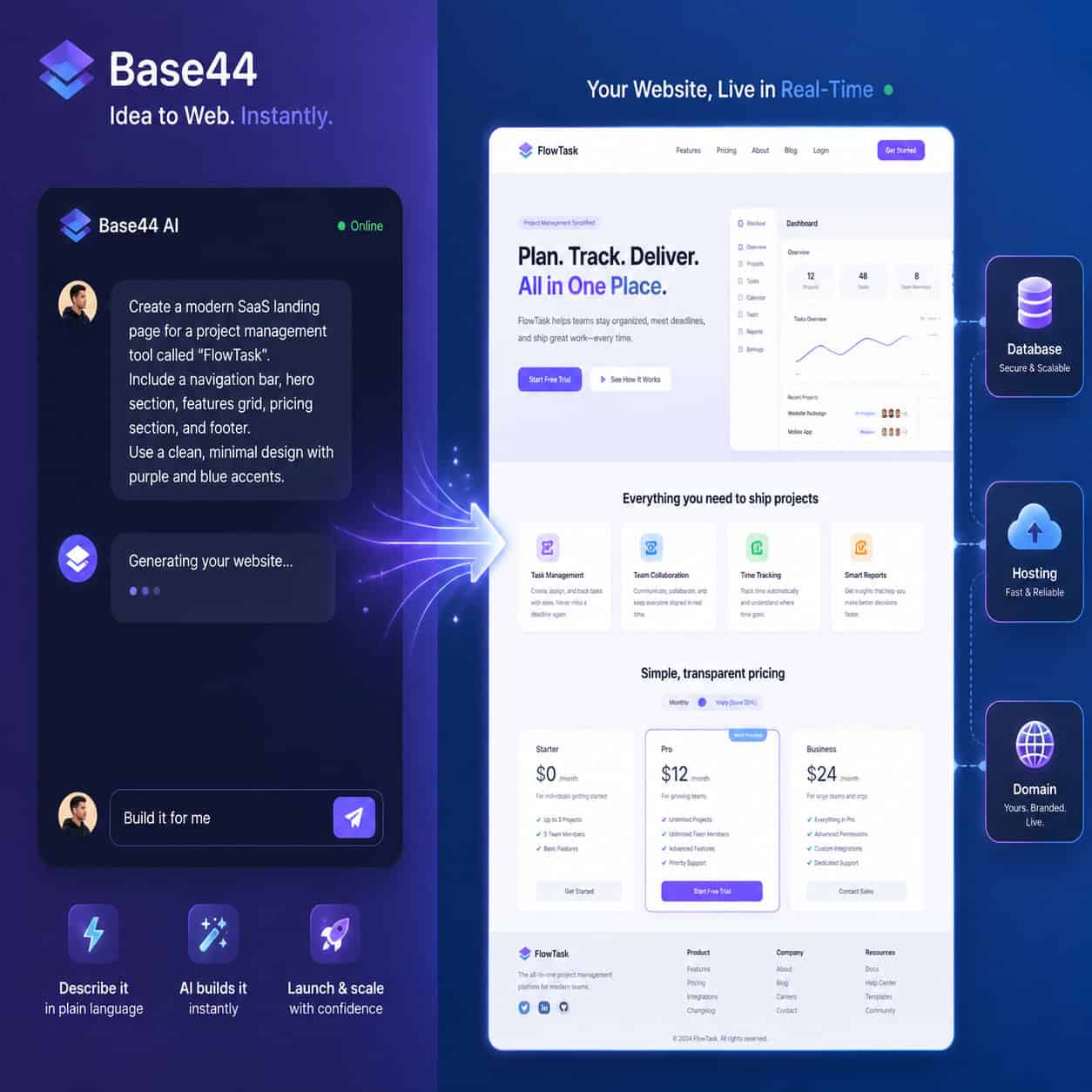
Here’s how the core workflow operates:
- Write a prompt describing your website (e.g., “Create a portfolio site for a freelance photographer with a gallery, contact form, and booking page”).
- Base44 generates the full-stack application, including pages, navigation, database tables, and basic styling.
- Preview and iterate by giving follow-up prompts to adjust layout, colors, features, or content [6].
- Publish to a Base44 subdomain or connect a custom domain on paid plans [2].
The platform handles backend infrastructure automatically. Unlike traditional no-code website builders that use drag-and-drop interfaces, Base44 relies on conversational AI to interpret your intent and build accordingly. This makes it faster for initial setup but less precise for pixel-level control.
Common mistake: Writing vague prompts like “make me a nice website.” The more specific your description (target audience, page structure, features needed), the better the output.
Who Should Use Base44 for Website Design?
Base44 works best for people who need a functional website quickly and don’t want to manage code or complex design tools. It’s not the right fit for everyone.
Choose Base44 if you are:
- A solo founder validating a product idea with an MVP
- A freelancer or small business owner who needs a professional web presence fast
- A non-technical person who finds drag-and-drop builders still too complex
- A developer who wants to prototype before building a production app
Skip Base44 if you need:
- Pixel-perfect design control (consider Figma-to-Webflow workflows instead)
- Enterprise-grade compliance and security features
- Complex multi-step business logic or heavy integrations
- Full code ownership and version control
Tech.co calls Base44 a “great vibe coding platform” for beginners and professionals alike, noting its gentle learning curve for quick full-stack validation [9]. The Zite blog agrees it’s “fantastic for rapid prototyping” but cautions that errors increase as app complexity grows [7].
How to Design a Website in Base44: Step-by-Step Guide with Practical Examples
This is where Base44 website design gets practical. Below is a walkthrough for building a small business website from scratch.

Step 1: Define Your Site Structure in the Prompt
Start with a detailed initial prompt. Here’s an example for a local bakery:
“Build a website for a bakery called Sweet Rise. Include a homepage with a hero image section and tagline, an ‘Our Menu’ page with categories for bread, pastries, and cakes, a ‘About Us’ page with the bakery’s story, and a contact page with a form and embedded Google Maps location.”
Step 2: Review the Generated Output
Base44 will produce all four pages with navigation, placeholder content, and default styling. Check for:
- Correct page structure and navigation links
- Appropriate section layout on each page
- Database tables (if your site includes dynamic content like menu items)
Step 3: Refine with Follow-Up Prompts
Iterate on the design with specific requests:
- “Change the color scheme to warm tones: cream background, brown headings, and gold accent buttons.”
- “Add a testimonials section to the homepage with three customer review cards.”
- “Make the menu page filterable by category.”
Step 4: Add Content and Media
Replace placeholder text and images with real content. Upload your own photos or describe what you need. If you’re creating brand assets, tools like Canva’s AI design features can help generate logos and graphics.
Step 5: Configure Settings and Publish
On paid plans, connect your custom domain and enable analytics [2]. Review mobile responsiveness (Base44 generates responsive layouts by default [3]) and publish.
Edge case: If your site needs blog functionality with SEO metadata, specify this in your prompt. Base44 can generate content management features, but you may need to refine them with AI-powered content tools for better search performance.
What Does Base44 Website Design Cost in 2026?
Base44 uses a credit-based pricing model. Every generation (initial build, iteration, or feature addition) consumes credits.
| Plan | Price | Credits | Best For |
|---|---|---|---|
| Free | $0/month | Limited monthly credits | Testing and exploration |
| Paid (Starter) | ~$20/month | Higher credit allotment | Solo projects and MVPs |
| Higher tiers | Varies | More credits + custom domains + analytics | Production sites and teams |
Pricing based on available data as of May 2026 [1][3]. Earlier 2025 reviews noted lower entry pricing around $12-16/month; current plans may differ.
Decision rule: If you’re building one simple site and want to test the platform, the free tier is sufficient. For ongoing iteration or multiple projects, a paid plan avoids credit bottlenecks. Complex sites consume credits faster because each prompt-based change counts as a generation [7].
How Does Base44 Compare to Other AI Website Builders?
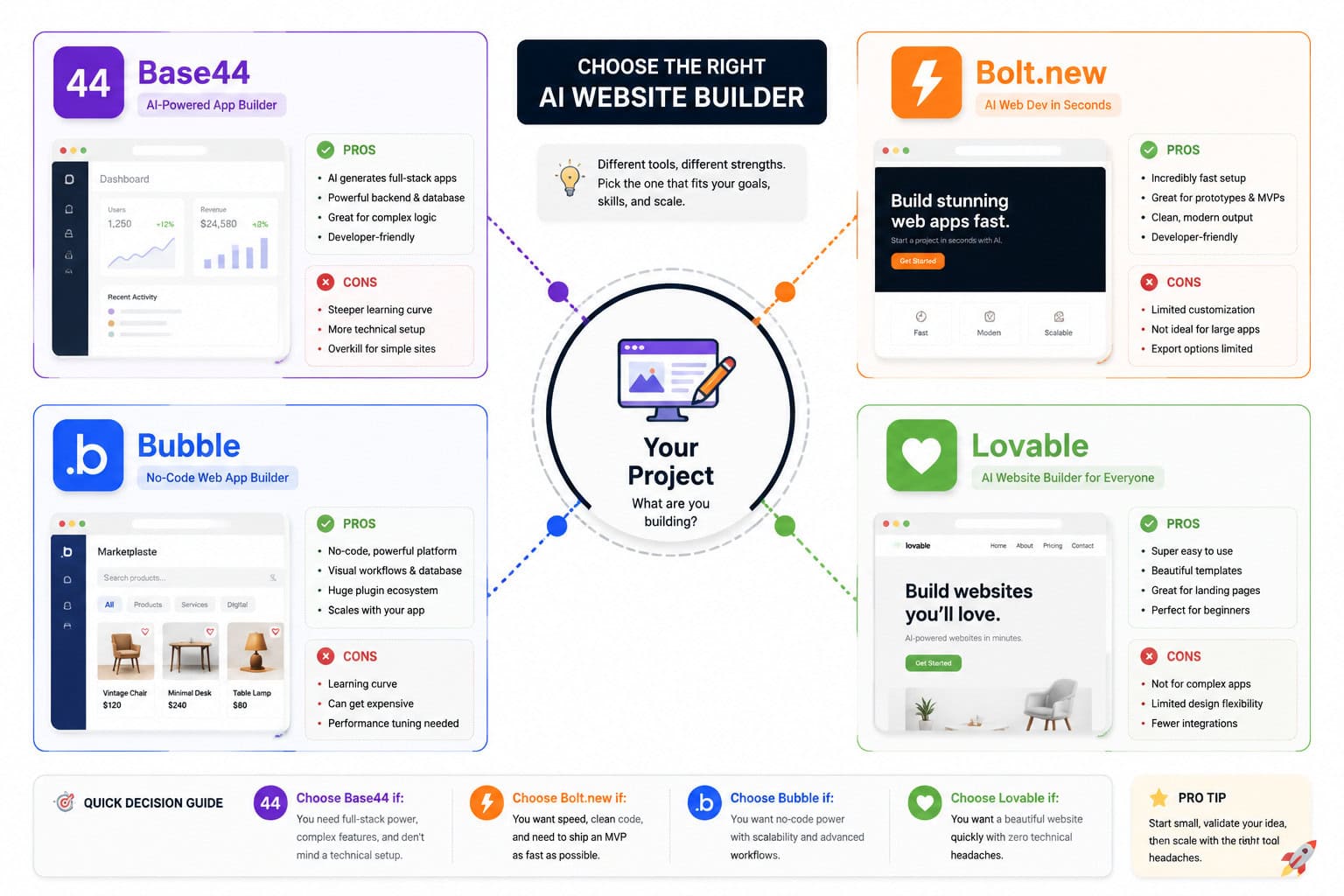
Base44 isn’t the only AI-powered option. Here’s how it stacks up against the most common alternatives:
| Feature | Base44 | Bolt.new | Bubble | Lovable |
|---|---|---|---|---|
| Input method | Text prompts | Text prompts | Drag-and-drop + logic | Text prompts |
| Backend included | Yes (auto-generated) | Yes | Yes (visual logic) | Limited |
| Code access | Minimal | More code control | No (visual only) | Moderate |
| Best for | Fast MVPs, simple sites | Full-stack with code needs | Complex apps | Clean web output |
| Starting price | Free / ~$20/mo | ~$25/mo | Free / $29/mo | Varies |
| Learning curve | Very low | Low-medium | Medium-high | Low |
Sources: [7][9] and third-party comparison reviews from early 2026.
Choose Base44 over Bolt.new if you want the simplest possible experience and don’t need to touch code. Choose Bolt.new if you want more control over the generated codebase.
Choose Bubble over Base44 if you’re building a complex application with multi-step workflows and need mature plugin ecosystems. Choose Base44 over Bubble if speed matters more than depth.
For a broader look at platforms in this space, see our roundup of the best drag-and-drop website builders and AI website creators.
What Are the Biggest Limitations of Base44 Website Design?
No tool is perfect. Here are the most frequently cited drawbacks based on user feedback and reviews:
- Design sameness. Default color palettes and layouts can look similar across Base44 sites. A May 2026 YouTube review noted this requires manual tweaking to achieve a unique look [4].
- Credit consumption. Complex projects burn through credits quickly, and costs can add up for iterative design work [7].
- Limited code control. You can’t easily export or modify the underlying code. Some Trustpilot reviewers have called the platform unreliable for code modifications.
- Scaling challenges. As application logic grows more complex, error rates increase. Reddit users in r/Base44 describe it as “best for fast prototyping” rather than production-grade complex apps.
- Backend migration. If you outgrow Base44, moving your backend and database to another platform isn’t straightforward.
Workaround for design sameness: After Base44 generates your site, use specific follow-up prompts to customize typography, spacing, color schemes, and component styles. Treat the initial output as a starting point, not a finished product.
Tips for Getting Better Results from Base44 Website Design
These practical strategies will improve your output quality:
- Be specific in your first prompt. Include page names, section types, target audience, and desired tone.
- Describe visual style explicitly. Say “minimalist with lots of white space, sans-serif fonts, and a navy-and-white color palette” rather than “modern looking.
- Iterate in small steps. Change one thing per follow-up prompt instead of requesting five changes at once.
- Use real content early. Replace placeholder text quickly so you can evaluate the actual design in context.
- Test on mobile. While Base44 generates responsive layouts by default [3], always preview on different screen sizes before publishing.
- Plan your information architecture first. Sketch out your sitemap and page hierarchy before writing your prompt. A quick wireframe in Figma can save credits by reducing trial and error.
Frequently Asked Questions
Do I need coding skills to use Base44? No. Base44 generates everything from text prompts, including frontend, backend, and database. PCMag describes the process as being “as easy as writing an email” [5].
Can I use a custom domain with Base44? Yes, on paid plans. Custom domain support was added as a feature, and you configure it through your project settings [2].
Is Base44 free? There’s a free tier with limited monthly credits. Paid plans start around $20/month as of 2026 [1].
Can Base44 build e-commerce sites? Base44 can generate product listings, shopping carts, and basic checkout flows. For complex e-commerce with payment processing and inventory management, you’ll likely need to test thoroughly and may hit limitations.
How does Base44 handle SEO? Base44 generates basic page structures, but you’ll want to manually optimize meta titles, descriptions, and heading hierarchy. Consider pairing it with AI-powered content optimization tools for better search rankings.
Can I export my Base44 site to another platform? This is currently a significant limitation. Base44 doesn’t offer straightforward code export or migration tools, which can create vendor lock-in.
How fast can I build a website with Base44? A basic multi-page website can be generated in minutes. Refinement and content addition typically take a few hours to a few days depending on complexity [9].
Is Base44 good for client work? It’s useful for rapid prototyping and presenting concepts to clients. For production client sites that need ongoing customization, evaluate whether the platform’s limitations fit the project scope.
What happened to the $12/month pricing I saw mentioned? Earlier 2025 reviews referenced lower pricing [3]. Base44’s pricing has evolved, and current plans start around $20/month for paid tiers [1].
Conclusion
Base44 fills a specific and valuable niche: getting from idea to working website as fast as possible, with zero coding required. It’s genuinely impressive for MVPs, prototypes, and simple business sites. But it’s not a replacement for platforms that offer deep customization, code ownership, or enterprise-grade features.
Your next steps:
- Try the free tier at base44.com with a specific project in mind, not just to browse.
- Write a detailed first prompt using the tips above. Spend 10 minutes planning your site structure before you type anything.
- Iterate deliberately. Budget your credits by making focused, specific follow-up requests.
- Evaluate honestly after your first project. If you need more design control, explore Figma-based design workflows or other no-code platforms.
Base44 won’t replace a skilled web developer for complex projects. But for the vast majority of people who need a functional, professional-looking website without the learning curve, it’s one of the most accessible options available in 2026.
References
[1] AI Website Builder – https://base44.com/ai-website-builder [2] Base44 – https://base44.com [3] Base44 Review: The Best AI Website Builder At The (Reddit, 2025) – https://www.reddit.com/r/AIToolTesting/comments/1mdh7fu/base44_review_the_best_ai_website_builder_at_the/ [4] YouTube Review (2026) – https://www.youtube.com/watch?v=Eprf3Otk-E8 [5] How Base44 Makes Building A Website As Easy As Writing An Email (PCMag, 2026) – https://www.pcmag.com/articles/how-base44-makes-building-a-website-as-easy-as-writing-an-email [6] Quick Start Guide – https://docs.base44.com/Getting-Started/Quick-start-guide [7] Base44 Review (Zite, 2026) – https://www.zite.com/blog/base44-review [8] AI Website Builder Blog – https://base44.com/blog/explore/categories/ai-website-builder [9] Base44 Review (Tech.co, 2025) – https://tech.co/ai/vibe-coding/base44-review [10] How To Create A Website With AI – https://base44.com/blog/how-to-create-a-website-with-ai